The live Earth,
on your desk.
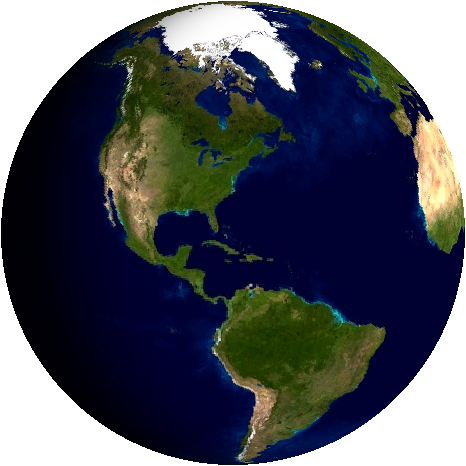
Planetaria is a desktop digital twin of Earth, computed live. The day/night line is where the Sun really is. The clouds are yesterday's satellite pass. The city lights come on where night has actually fallen.
Computed live, every frame
What you see is driven by the Sun's true position for the current date and time, fresh NASA imagery, and your own local clock.
The real day & night
The sunlit and shadowed halves are placed astronomically: a soft twilight band sweeps the globe exactly as it sweeps the planet. Watch in real time, or run a smooth time-lapse and see a full day pass in two minutes.
Cities that switch on at dusk
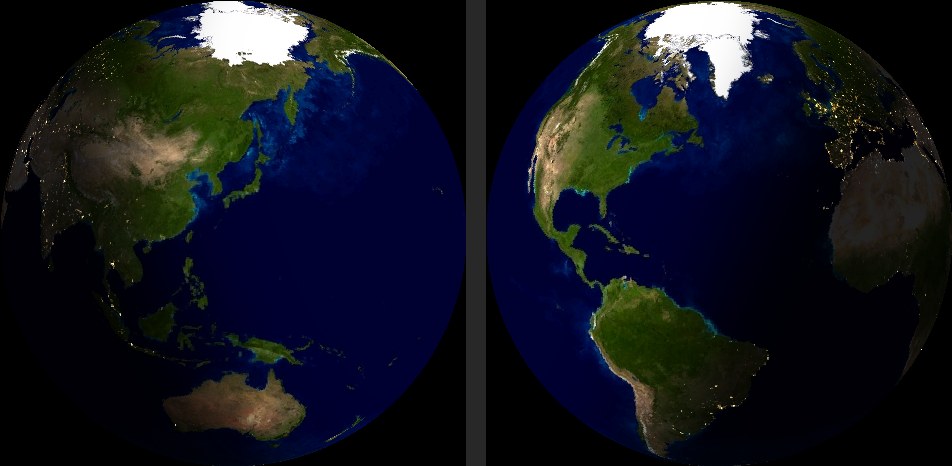
As the terminator passes, the night side glows with the world's real city lights, exactly where they fall across the shadowed half. Cloud cover is downloaded daily from NASA's VIIRS satellites, with honest gap-filling where the satellite hasn't looked yet.
Eleven views, one dial
Earth is live; nine more worlds and a live star chart are a settings-page tap away, switching in seconds without a restart. The Night Sky view is a planisphere of the constellations above your location, with the Moon at its true position showing its real phase, and the five naked-eye planets as colour-coded dots, so "what's that bright star?" finally has an answer. The Moon view keeps its near side toward you, tidally locked like the real thing, lit exactly as much as tonight's moon. On a schedule you choose, a tide card pops up like the weather card: the water level right now, today's true curve, and the next high and low from the nearest NOAA station; then the globe returns. And on Earth itself, recent earthquakes pulse at their real epicentres, straight from the USGS feed.

Time & weather, on the half hour
A glance, then back to orbit
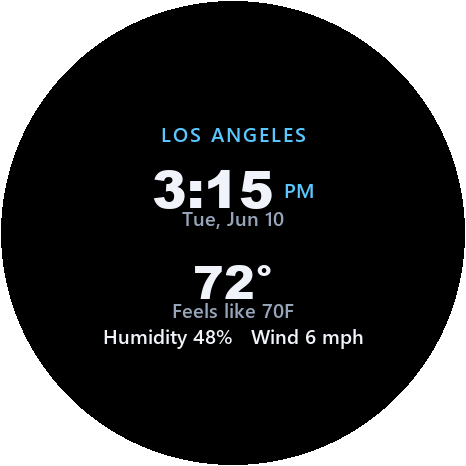
Every 30 minutes (or on the schedule you choose) the globe turns into a clean watch face: local time, date, your city, the temperature and what it feels like, humidity and wind. About 25 seconds later, Earth returns.
Location and timezone are worked out automatically, including daylight saving, or pin your zone manually in settings.
Two minutes to orbit
Plug it in
USB-C, any phone charger. The globe wakes and opens its own Planetaria-Setup WiFi hotspot.
Tell it your WiFi
Join the hotspot with your phone; a setup page appears. Enter your network and password (school & work 802.1X networks supported).
It hands you the keys
The page connects the globe and shows you its settings address. From then on it runs itself: clouds, weather, and the clock all update automatically.
Installing firmware
The web installer writes firmware to the globe over USB, straight from a Chrome or Edge browser, which does the whole job on its own. It asks for a passcode, because the installer serves the firmware image itself.
Instrument specifications
| Display | 1.75″ round AMOLED, 466 × 466; deep blacks, made for space |
| Processor | Espressif ESP32-S3, dual-core 240 MHz · 8 MB PSRAM · 16 MB flash |
| Rendering | Per-pixel spherical projection, real subsolar lighting, smooth sub-second motion; quality & performance modes |
| Data sources | NASA GIBS/VIIRS imagery · MET Norway weather · USGS earthquakes · NOAA tides · CelesTrak orbits · geojs.io location · internet time; all keyless and open |
| Connectivity | WiFi 2.4 GHz · WPA2 Personal and Enterprise (802.1X); remembers 3 networks |
| Controls | Web settings page on your network · optional auto-dim after local sunset · power-cycle 3× to reopen setup |
| Power | USB-C, 5 V; runs whenever it's plugged in |
| Privacy | Settings live on the globe; setup happens on your own network |